Trading with Leverage in Volume
Leverage lets you control a bigger position than your cash alone would allow. Put up $100 at 10x leverage and you're trading with $1,000 of market exposure — meaning a 5% move in the market swings your P&L by 50%, not 5%. It's one of the fastest ways to grow an account, and one of the fastest ways to shrink one.
Volume is a paper trading simulator, which makes it the right place to find out how leverage actually feels before you ever risk anything real. This guide covers where the leverage control lives, how it changes your position as you adjust it, and how to use it without blowing up your account.
What Leverage Actually Does
Without leverage (1x), your P&L moves dollar-for-dollar with your position size. Leverage multiplies that. A 10x leveraged $100 position behaves like a $1,000 position — if the market moves 2% in your favor, you gain 20% instead of 2%. If it moves 2% against you, you lose 20% instead of 2%.
That symmetry is the entire risk story: leverage doesn't change your odds of being right, it changes how much every point of being wrong (or right) costs you.
Setting Leverage on the Trade Ticket
Leverage is available on Crypto, Futures, and Forex tickets — not on Stocks (more on that below).
-
From the gameroom, click New Trade to open the buy ticket.
-
Below the Amount and Direction fields, find the Leverage control. It defaults to 1x.
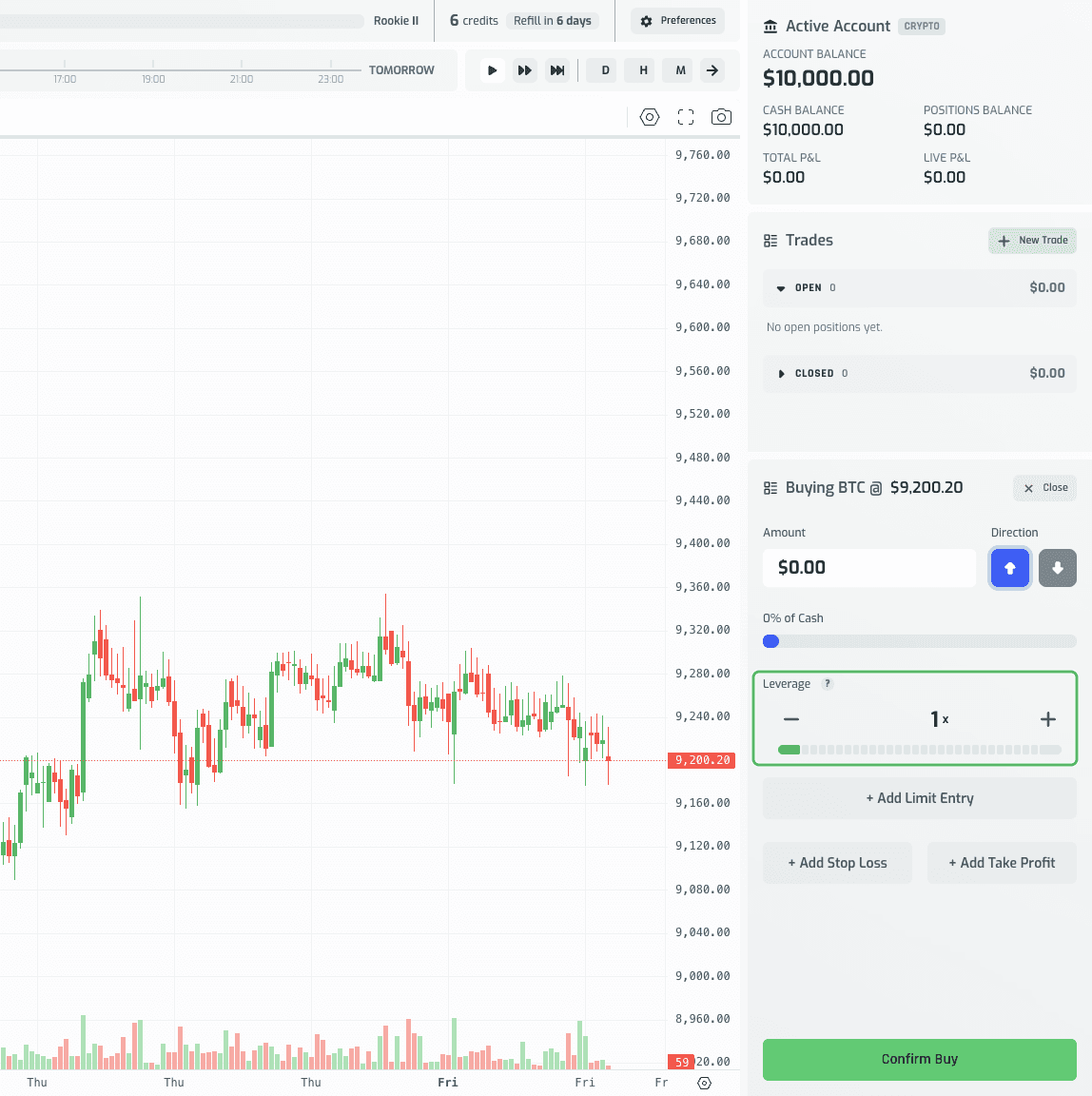
-
Adjust it any of three equivalent ways — they all stay in sync:
- Type a number directly into the leverage field (e.g.
10). - Click the − / + buttons to step down or up by 1x.
- Drag the leverage slider/meter beneath the input.
- Type a number directly into the leverage field (e.g.
-
As you raise leverage, the meter bar fills and shifts from green toward red — a visual cue that you're taking on more risk.
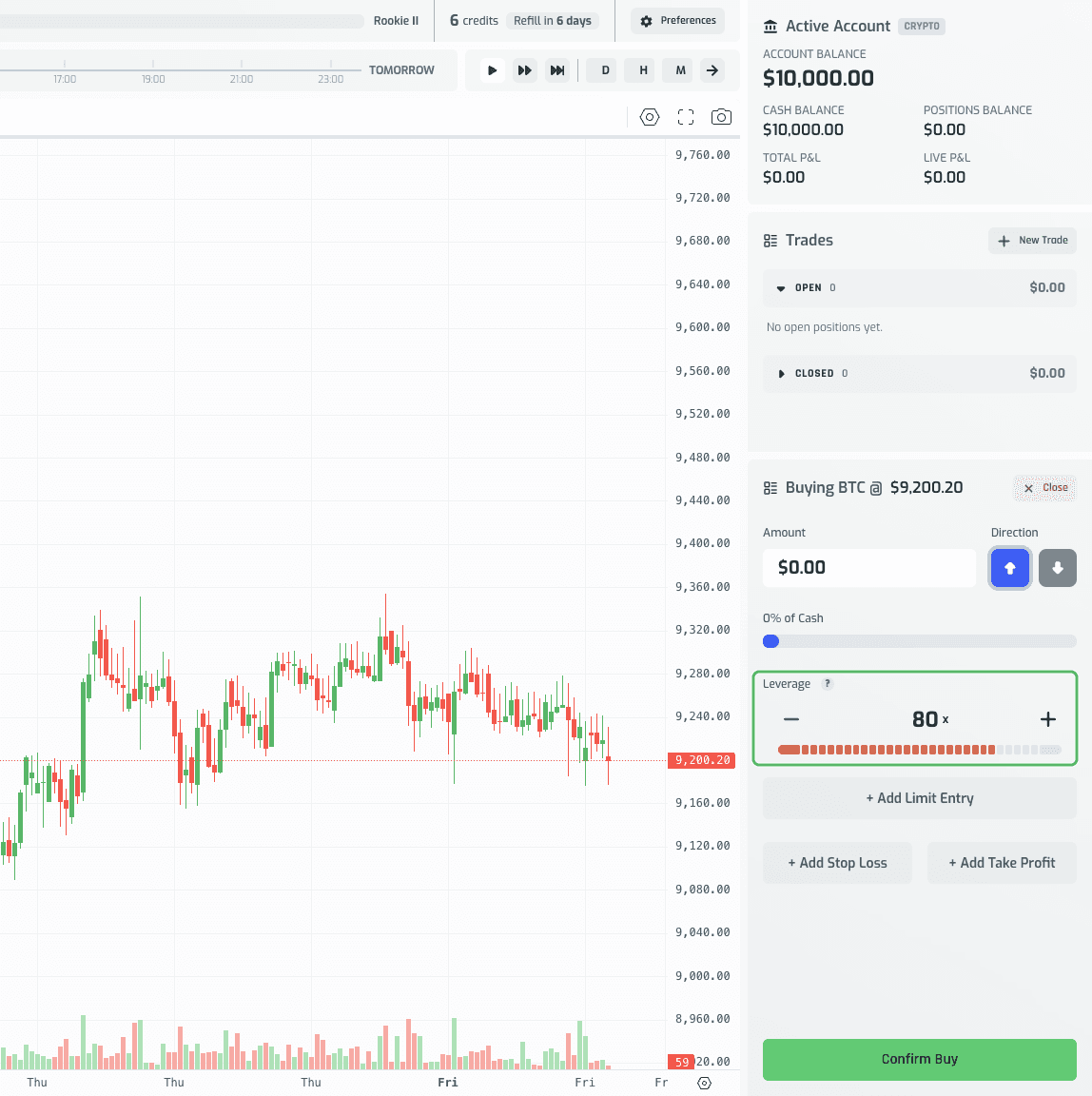
Each market has its own maximum leverage:
- Crypto: up to 100x
- Futures: up to 20x
- Forex: up to 50x
If you type or step past a market's max, a toast appears (e.g. "Leverage cannot exceed 100x for crypto") and the value snaps back down to the cap. Going below 1 — including negative numbers — snaps back up to 1x.
Reading Your Exposure Before You Confirm
Once you've entered an Amount and chosen your leverage, check the Trade Summary at the bottom of the ticket. It shows your leverage multiplier and your total Exposure — Amount × Leverage:
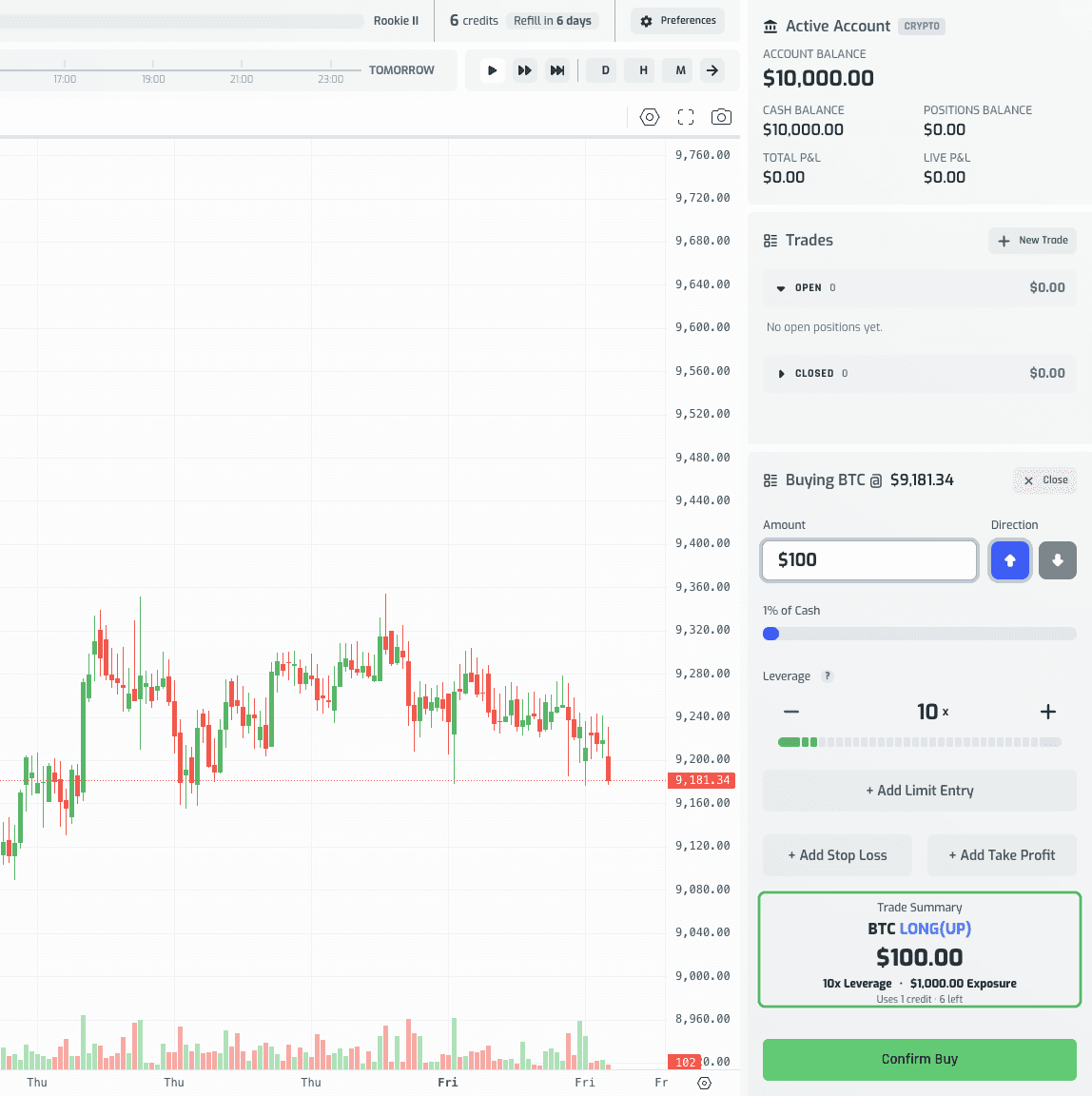
A $100 amount at 10x leverage shows "10x Leverage · $1,000.00 Exposure" — that $1,000 figure, not the $100 you put up, is the number that actually moves with the market.
A note on liquidation: unlike some real trading platforms, Volume doesn't display a liquidation price, because there's no forced liquidation at all. A leveraged position that loses 100% of the margin you put up isn't automatically closed — it stays open, its value can go negative, and closing it out yourself will debit your cash for more than you originally risked. If your account balance is driven all the way to zero, the session ends in a Game Over and that backtest account is closed. That makes it even more important to size your leverage deliberately, since nothing in the interface will stop a losing trade for you except your own stop loss.
When the amount and leverage look right, click Confirm Buy to open the position.
Seeing Leverage on an Open Position
Once opened, the position's row in the Open trades list shows a small leverage badge next to the symbol:
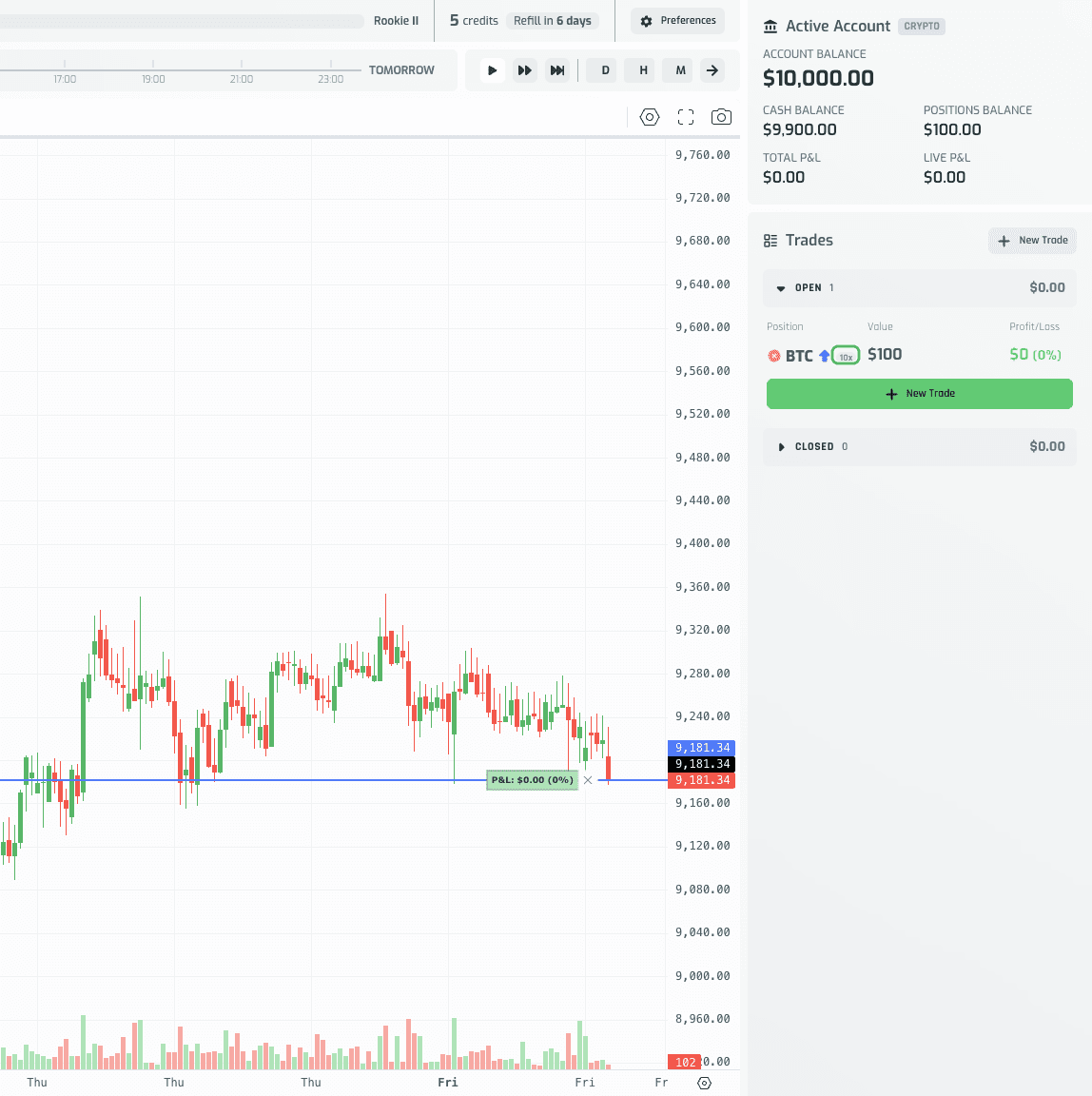
Hover the badge to see "Opened at {n}x leverage." This is a handy way to scan your open positions and immediately spot which ones are amplified.
One thing to know: opening a new ticket via New Trade always resets the Leverage control back to 1x. Your last-used leverage doesn't carry over, so double-check the control every time you open a new leveraged trade.
Closing a Leveraged Position
Click an open position's row to load it into the ticket in sell mode. The Leverage control is still shown, but it's disabled (greyed out) — you can't change leverage while closing a position. It simply displays the real leverage the position was opened at, and the Trade Summary reflects that same figure. Adjust the amount or percent you want to sell and click Confirm Sell as usual.
Stocks Don't Use Leverage
The Stocks ticket doesn't have a Leverage control at all — in its place is an Expiration control, which governs how long the trade stays open instead of how big your exposure is:
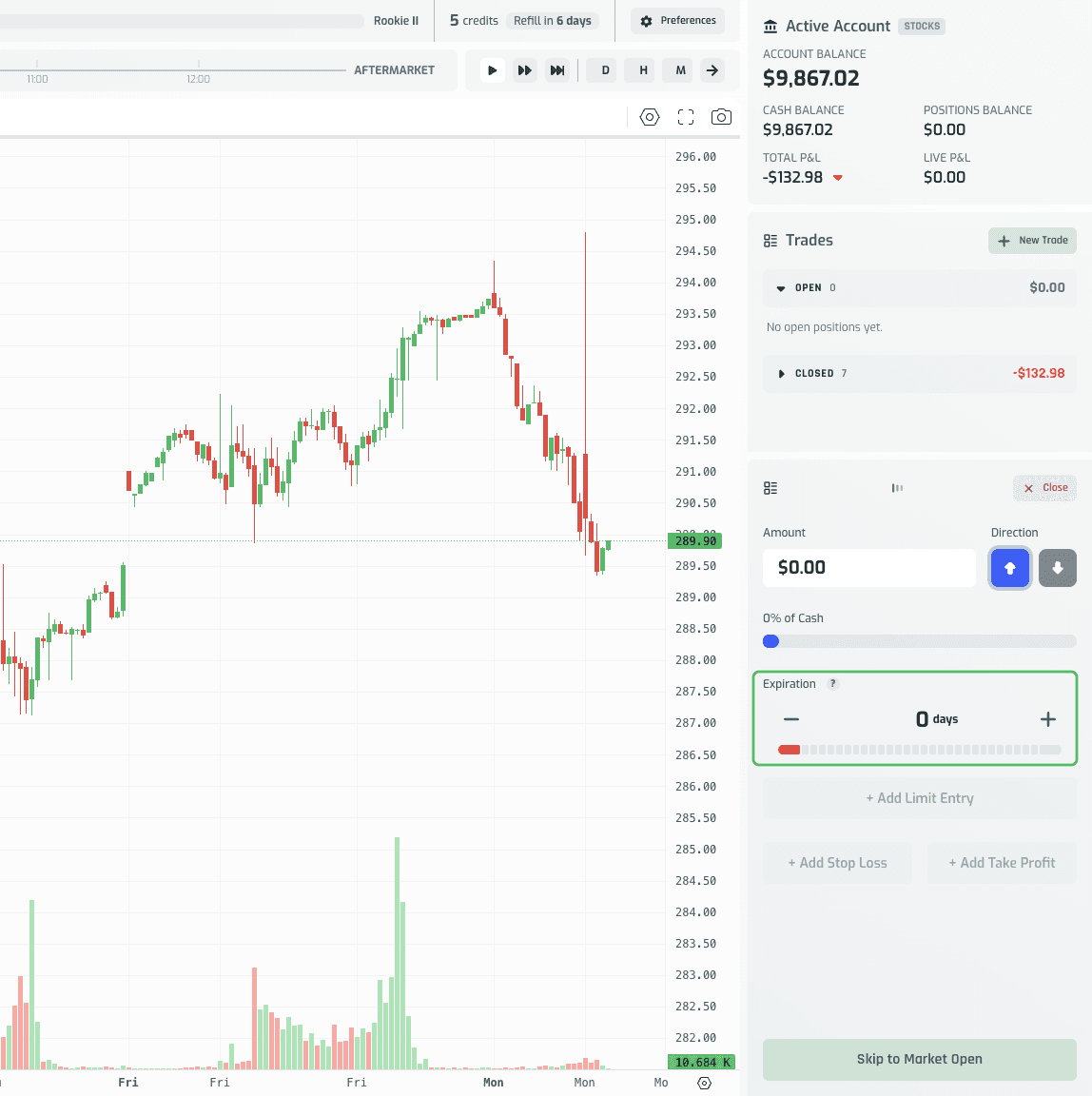
If you want to practice leveraged trading specifically, open a Crypto, Futures, or Forex game rather than a Stocks one.
Practicing Leverage Responsibly
Leverage is a tool, not a strategy — the same position-sizing discipline that matters at 1x matters even more once a multiplier is involved. A few habits worth building here, since Volume is exactly the place to build them without consequence:
- Start low. Get a feel for how a 2x or 3x position moves before jumping to 50x or 100x — the meter turning red is a real signal, not just decoration.
- Size the position, not just the leverage. A small amount at high leverage and a large amount at low leverage can produce the same exposure — think in terms of total exposure, not just the multiplier.
- Use a stop loss. Leverage magnifies losses just as fast as gains; a stop loss set at a logical level protects you from a fast move erasing more of your account than you intended to risk. With no liquidation to stop a losing position for you, the stop loss is the only thing standing between a bad trade and a Game Over.
- Watch the Trade Summary, not just the Amount field. The dollar figure you typed is not the number that determines your P&L — the Exposure figure is.
Because there's no real money and no permanent consequence, Volume is the safe place to find your own comfort level with leverage — a lesson far better learned here than on a live account.