Market Order vs Limit Order vs Stop Order: Which One to Use and When
Market order vs limit order vs stop order comes down to two questions every trade has to answer: whether you get filled and at what price. You can't have both guaranteed at once. A market order guarantees the fill but not the price. A limit order guarantees the price but not the fill. A stop order waits for a price and then gets you out (or in) at whatever the market offers.
This guide walks through the five order types you'll use most, each applied to the same $100 stock, then shows how to practice them in Volume.
If you're looking for the button-by-button instructions instead, see Placing Orders in Volume.
Market Order
What it does: buys or sells immediately at the best price currently available.
When it fills: right away, as long as the market is open.
What it costs you: price certainty. In live markets, the price you see and the price you get can differ, especially in fast or thinly traded markets. That gap is called slippage.
Scenario: the stock is trading at $100.00. You place a market buy for 10 shares. In a calm, liquid market you'd expect to pay very close to $100.00. If price is moving fast, you might pay $100.05 or more, because the order takes whatever is available at that moment.
Use a market order when getting in (or out) now matters more than the exact price.
Limit Order
What it does: buys or sells only at your chosen price or better. A buy limit sits below the current price; a sell limit sits above it.
When it fills: only if the market reaches your price. It might fill in minutes, hours, or never.
What it costs you: the risk of a missed fill. If price comes within a few cents of your level and then takes off without you, the order simply sits there.
Scenario: the stock is at $100.00 and you think $98.00 is a fair place to buy because it has held as support before. You place a buy limit at $98.00. If price dips to $98.00, you're filled at $98.00. If it bottoms at $98.10 and rallies to $105, you're not in the trade at all.
Use a limit order when you'd rather miss the trade than overpay.
Stop Order (Stop-Loss)
What it does: sits dormant until price reaches your stop price, then triggers an order. Most traders use it as a stop-loss: an exit that caps how much a losing trade can cost.
When it fills: once price touches the stop level. In live markets a basic stop then becomes a market order, so it fills at the next available price.
What it costs you: price certainty again. If the stock gaps past your stop overnight, the exit can happen well beyond the level you set.
Scenario: you bought at $100.00 and decide the trade is wrong if price falls to $97.00. You place a stop at $97.00. If price drops there, you're taken out, and your loss is about $3 per share instead of whatever it might have become. If the stock opens the next morning at $95.00, a real-world stop would fill near $95.00, not $97.00.
Use a stop-loss on every trade where you can define the price that proves your idea wrong. Our stop loss and take profit guide covers how to choose that level.
Take-Profit Order
What it does: a limit order on the exit side. It closes your position when price reaches your target.
When it fills: when price reaches the target level.
What it costs you: upside. If the move keeps running past your target, you're already out.
Scenario: you bought at $100.00 with a target of $106.00. When price hits $106.00, the position closes for about $6 per share. If the stock keeps climbing to $110, that extra $4 isn't yours. That's the trade-off for a gain that's locked in rather than hoped for.
Use a take-profit when your plan has a defined target.
Bracket Order
What it does: combines an entry with both a stop-loss and a take-profit, so the full plan is set before the trade begins. When one exit fills, the other is cancelled.
When it fills: the entry fills first (market or limit). The exits then wait until price reaches one of them.
What it costs you: flexibility. The plan runs on its own, which is the point, but it won't adapt unless you change it.
Scenario: the stock is at $100.00. You place a buy limit at $98.00 with a stop at $96.00 and a take-profit at $104.00. If you get filled, you're risking $2 per share to make $6, a 1:3 risk/reward ratio, and you know both outcomes before the trade exists.
Market vs Limit vs Stop Order: Side-by-Side
| Order type | Fills when | Guarantees | Main risk |
|---|---|---|---|
| Market | Immediately | A fill | Slippage: paying more (or receiving less) than you saw |
| Limit | Price reaches your level or better | Your price (or better) | Missed fill: price never gets there |
| Stop / stop-loss | Price touches the stop level | That the order triggers | Gaps: the fill can land past your stop |
| Take-profit | Price reaches your target | Your target price (or better) | Missing a larger move after you exit |
| Bracket | Entry first, then one of the exits | A pre-set exit plan on both sides | Rigid if conditions change mid-trade |
Which Order Type Should You Use?
| Situation | Typical order | Why |
|---|---|---|
| Breakout entry: price is pushing through a level right now | Market | Speed matters more than a few cents; a limit may never fill once price runs |
| Pullback entry: you want to buy a dip to support | Limit | You name the price and let the market come to you |
| Protecting a position | Stop-loss | Caps the damage if the trade goes wrong while you're not watching |
| Locking gains at a planned target | Take-profit | Exits on your plan instead of on your emotions |
| Planning the whole trade up front | Bracket (entry + stop-loss + take-profit) | Defines risk and reward before you're in the trade |
No order type is "the best." Most complete trades use more than one: an entry order plus a stop-loss and take-profit.
How to Practice Each Order Type in Volume
Volume replays real historical market data with time acceleration, using a virtual balance you choose ($100 to $50,000). Nothing is executed for real, so it's a low-stakes place to see how each order type behaves. If you haven't placed a trade yet, start with How to Make Your First Trade.
Market orders from the ticket
Open the trade ticket with New Trade, enter an amount, choose a direction, and leave Limit Entry unset. That's a market order: it fills instantly at the displayed price. In the example below, a $1,000 long on SPY at $126.71, with a stop-loss and take-profit attached before entry.
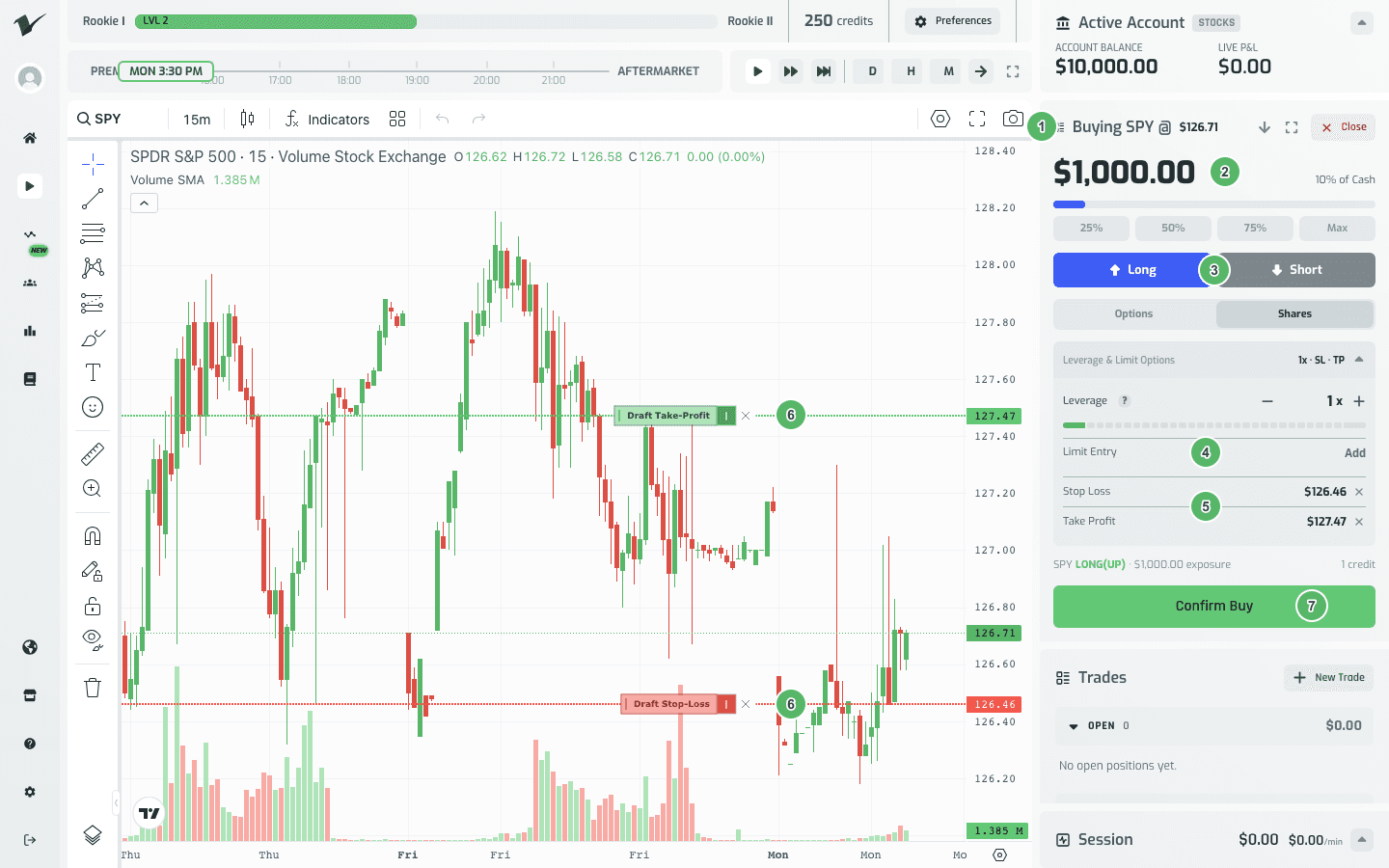
What you're seeing:
- Ticket header: "Buying SPY @ $126.71", the live price. With no limit entry, this is the price you'd be filled at.
- Amount: how much of your virtual cash goes into the trade.
- Direction: Long if you expect price to rise, Short if you expect it to fall.
- Limit Entry: still showing "Add", which is what keeps this a market order.
- Stop Loss and Take Profit: attached before entry, so this market order is also a bracket.
- Draft lines on the chart: your take-profit (green, above) and stop-loss (red, below) levels.
- Confirm Buy: places the order. We didn't press it for this screenshot.
One honest difference from live markets: Volume fills market orders at the displayed price and does not simulate slippage, so treat slippage as a concept to understand rather than something you'll see here.
Limit orders from the ticket or the chart
Click Add next to Limit Entry (under Leverage & Limit Options in the ticket) and type your price, or right-click the chart at the level you want and choose Create Limit Order at $X. The ticket header switches to "Buy Limit" and a draft entry line appears on the chart. Below, the same $1,000 long is set to buy only on a pullback to $126.40.
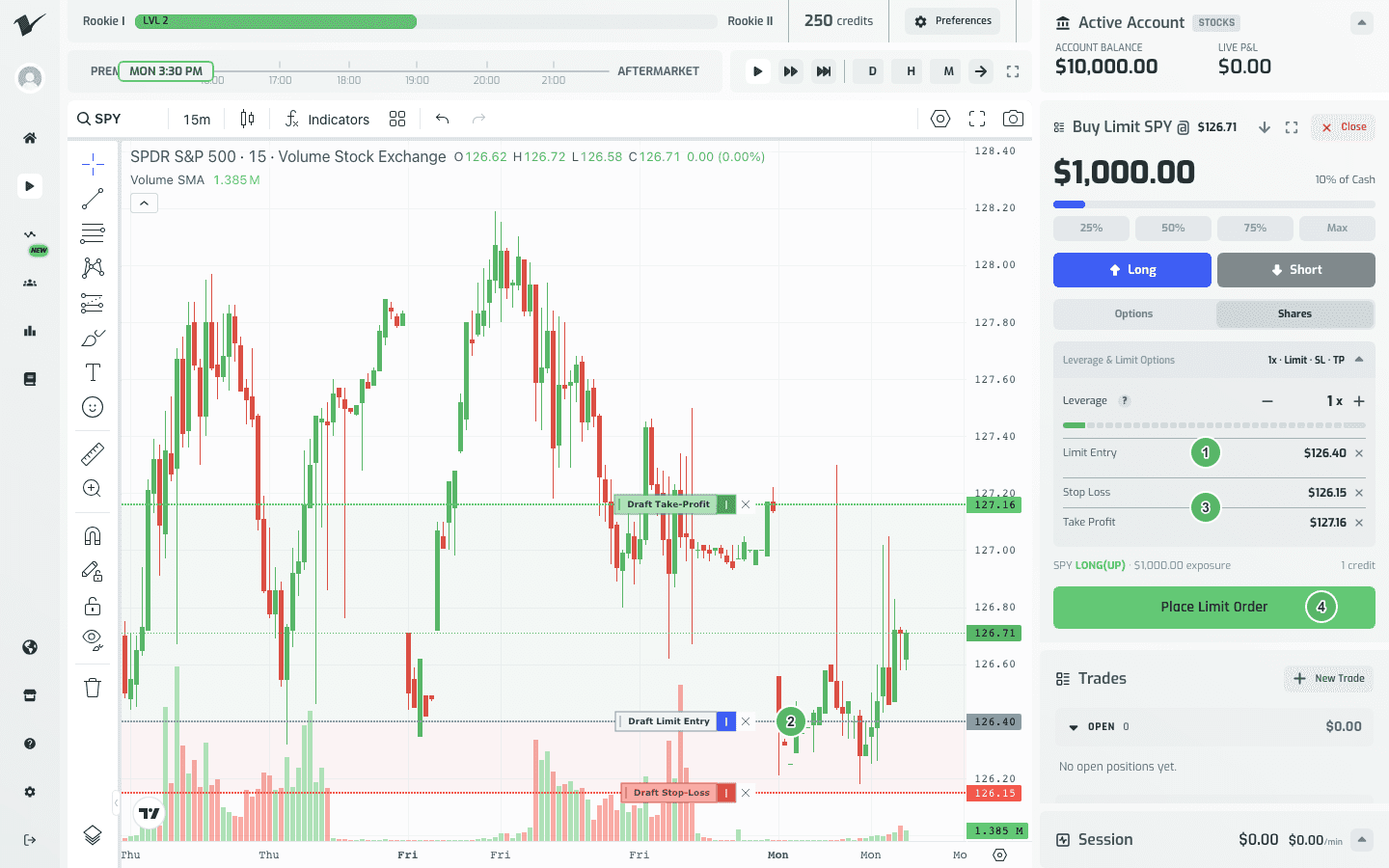
What you're seeing:
- Limit Entry price: $126.40, below the live price of $126.71, so this order waits for a pullback.
- Draft Limit Entry line: where your order will wait on the chart.
- Stop Loss and Take Profit: added after the limit entry, so they're placed around your entry price rather than the live price. Together with the entry, this is a bracket order.
- Place Limit Order: the confirm button changes to show this order will wait rather than fill now.
Stop-loss and take-profit that run themselves
Attach a Stop Loss and Take Profit to any trade, at entry or afterward. As the game clock advances, the position closes automatically when a bar's high or low touches either level, so your plan executes even when you're not watching. In Volume, stops are exits only: they attach to a position or a pending limit order, and there is no separate stop order for entering a trade.
Watch a limit order fill or get skipped in seconds
This is where time acceleration helps. Place a limit order at a pullback level, then press play at a fast speed or skip forward with the time controls. Within seconds you'll see whether price came back and filled the order or ran away and left it pending. A limit order fills at your exact entry price once a later bar touches it, and only while the market is open. Repeat that across dozens of setups and you'll build a feel for when limit orders work and when a market order makes more sense.
FAQ
What is the difference between a market order and a limit order?
A market order fills immediately at the best available price, so you're guaranteed a fill but not a price. A limit order fills only at your chosen price or better, so you're guaranteed the price but not the fill.
What is a stop order?
A stop order waits until price reaches a level you set, then triggers. Traders most often use it as a stop-loss, an automatic exit that limits how much a losing trade can cost.
What is the difference between a limit order and a stop order?
A limit order is placed at a price better than the current one (buy below, sell above) and fills only at that price or better. A stop order is placed at a price worse than the current one for your position, and once triggered it fills at the next available price, which can be past your level.
Should beginners use market or limit orders?
Both have a place. Market orders are simpler and suit entries where timing matters. Limit orders suit planned entries at specific prices. Whichever you use, attaching a stop-loss before you enter is a habit worth building early.
Practice the Trade-Off
Open the gameroom, place a limit order at a pullback level, attach a stop-loss and take-profit, and fast-forward to see how it plays out. Then try the same setup with a market order and compare.